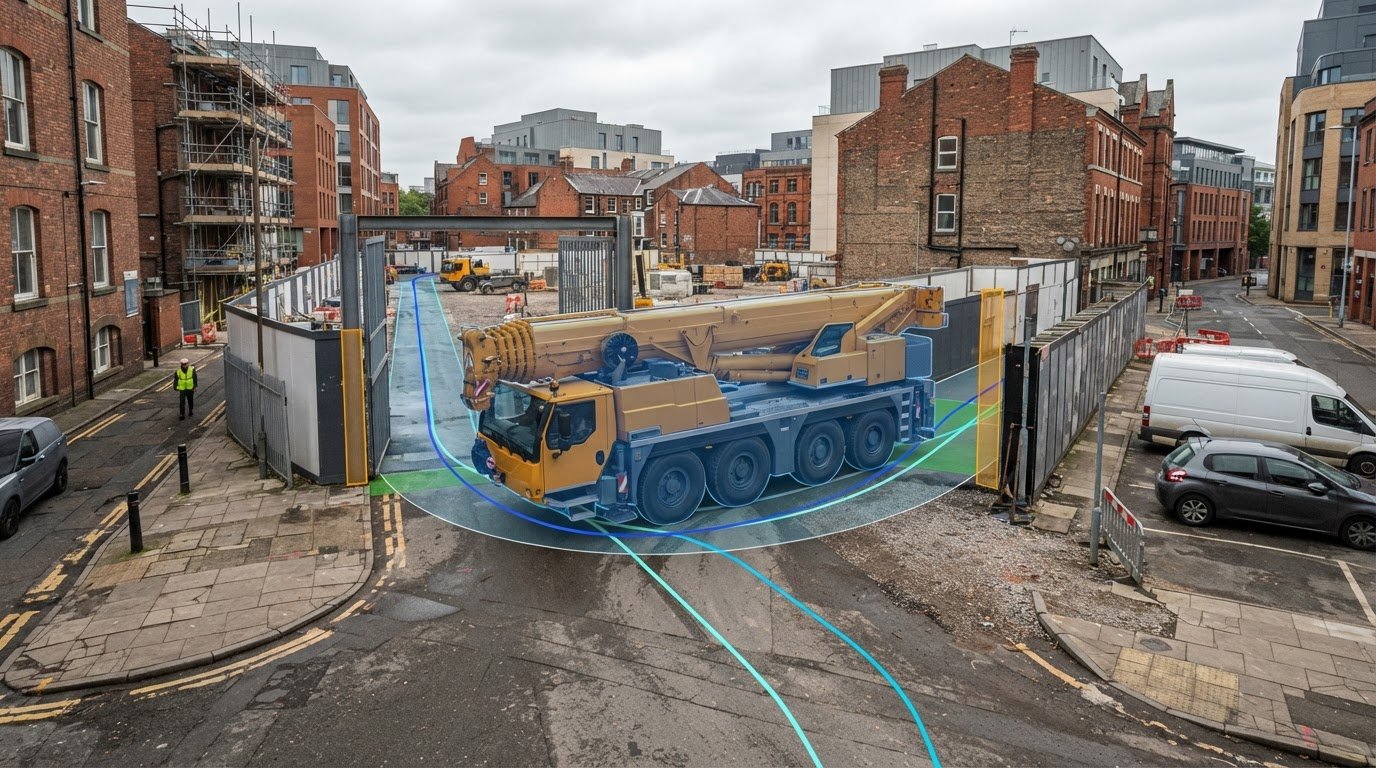
A crane route can look clear on a site plan and still leave too little room to turn. Swept path analysis for a mobile crane uses vehicle-tracking software to show the space the crane needs to enter, manoeuvre and leave. The drawing can reveal whether its swept envelope conflicts with site boundaries, structures or other constraints.
Access planning requires more than a line showing where the crane travels. You need to see how its body and wheels move through each turn and where clearances become tight. This guide explains what the analysis checks and what information to provide, then outlines the details that make a swept path diagram useful: the vehicle, route, manoeuvre, wheel paths, body positions and swept envelope.
Key Takeaways
- Use the crane’s actual dimensions and manoeuvring characteristics to assess the route, rather than relying on a generic vehicle outline.
- Trace entry, turning, positioning and exit movements to identify tight clearances and potential conflicts before construction access is needed.
- Consider vertical as well as horizontal constraints where overhead obstructions could affect the planned movement.
- Make the diagram practical to review by showing the vehicle, route, wheel paths, body positions and swept envelope against a clear site layout.
- Understand how a swept path specialist can prepare the analysis and how ML Traffic Engineers UK’s Swept Path Analysis can support access planning.
What is Swept Path Analysis?
Swept path analysis for a mobile crane uses vehicle-tracking software to test how the crane moves along a proposed route. It shows the space needed for turns, entry, positioning and exit.
To see how vehicle-tracking software models turning movements and access, watch this Autodesk tutorial:
The analysis combines vehicle dimensions with a site layout and a defined manoeuvre. The resulting drawing helps reviewers assess whether the vehicle can follow the route without crossing boundaries or conflicting with fixed features. For construction access, the test should represent the crane and movement planned for the site, not just a similar-looking vehicle.
Vehicle Dimensions for Tracking
Vehicle dimensions define the model used in the calculations. For a mobile crane, key details include overall length and width, wheelbase, axle positions, and front and rear overhangs. Steering arrangement and turning characteristics also affect how the vehicle tracks through a bend. Use data that represents the crane configuration intended for the movement, because differences in geometry change the swept envelope.
Plans, Vehicle Details and Manoeuvres
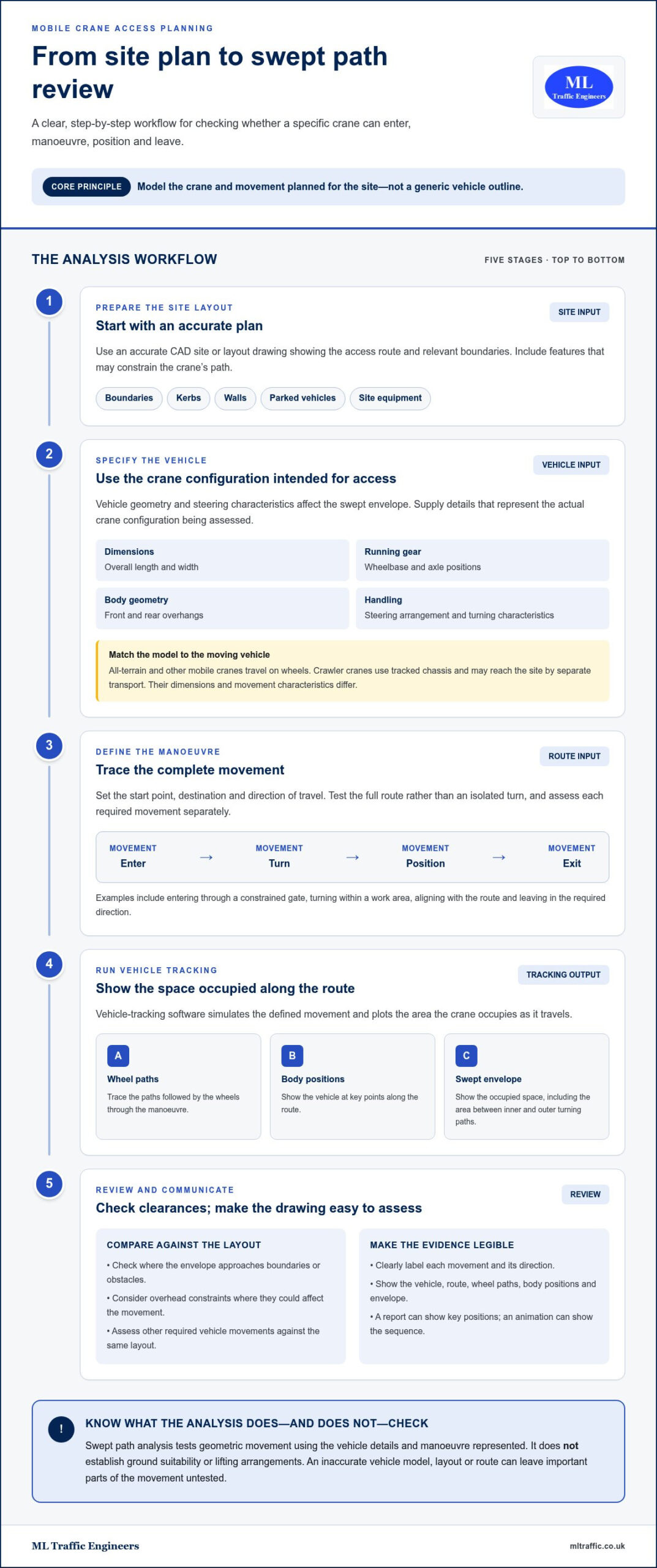
Start with an accurate CAD site or layout drawing showing the access route and relevant boundaries. Provide the vehicle type, its dimensions and the manoeuvre to test, such as entering through a constrained gate, turning within a work area or leaving the site. Define the movement from its starting point to its destination so the tracking shows the full route, not just an isolated turn.
Also identify features that could affect the vehicle’s path, including kerbs, walls, parked vehicles and site equipment. The drawing should reflect the layout being assessed. Where several movements are necessary, assess each one separately and clearly label its direction. For a development in London, this access evidence can form part of wider transport planning, as explained in this London transport assessment guide.
Design Vehicles and Swept Envelopes
Standard UK design vehicles provide established dimensions for assessing general access, and DMRB design vehicles are a UK-specific reference. A standard model can help test typical traffic movements, but may not represent a particular mobile crane. If a specific crane is planned, use its dimensions and characteristics so the assessment reflects the intended transport movement.
Vehicle-tracking software simulates the movement and plots the space occupied along the route. The drawing can show wheel paths, vehicle body positions and the swept envelope, including the space between the outer and inner turning paths. Review the envelope against the site plan to identify where the turn approaches an edge or obstacle. A clear model and legible drawing make the movement easier to assess.
Mobile crane swept-path and turning analysis
Turning analysis tests whether the selected crane can follow its planned route and reach its working position. It may be needed before construction or for planning, highway review or construction-management submissions.
Crane Turning Movements
Consider the crane type and the movement being modelled. All-terrain and other mobile cranes travel on wheels, while crawler cranes move on tracked chassis and may reach the site by separate transport. Their dimensions and movement characteristics differ, so the model must match the vehicle making the access movement. The analysis can test arrival, turning, positioning and departure.
For construction access, examine the complete manoeuvre, not just the turn. Check whether the crane can approach the entrance, align with the route and leave in the required direction. Where refuse or emergency vehicles must also pass, assess those movements against the same layout.
Turning Circles and Radii
A turning circle describes the space a vehicle needs to turn; turning radii describe paths traced by parts of that vehicle. A worked passenger-car example uses a length of 4.70 m, a width of 1.85 m and a wheelbase of 2.70 m. Its outer turning radius is 5.60 m, while its swept envelope is 3.16 m wide.
These figures illustrate why vehicle dimensions alone don’t define turning space. The front and rear corners and wheels follow different arcs. For a crane, use the specific vehicle data and tracking result, not the passenger-car example, to judge whether the entrance and turning area provide enough room.
Reports and Simulation Animations
A turning report can show the vehicle path, swept envelope and positions at key points in the manoeuvre. An animation can add a sequential view, helping reviewers follow how the vehicle approaches, turns and aligns with the site layout. Compare both with the plan, especially where the vehicle passes close to a boundary or another constraint.
For example, a constrained site entrance may require analysis of the turn from the adjoining road into the access. The drawing should make the movement clear, including the available turning space and the crane’s position at critical points. This shows why assessing a specific access movement, rather than a general vehicle outline, can be central to review.
Analysis Requirements and Limitations
In the UK, swept path analysis may be required before construction or for a planning application, highway review or construction-management submission. An authority may also request it to demonstrate access, manoeuvring and departure. The vehicle and movement should reflect the project’s actual access requirements.
Common risks include modelling the wrong vehicle, using an inaccurate layout or omitting part of the route. The analysis tests geometric movement; it doesn’t establish ground suitability or lifting arrangements. Its result depends on the vehicle details and manoeuvre represented. For a practical explanation of drawing-based tracking, see this AutoTURN swept path analysis guide.
Who prepares a construction swept path analysis
Engineers or architects with swept path analysis expertise can prepare construction vehicle tracking drawings. Their task is to model the intended vehicle movement against site and highway constraints, then present the route clearly for review. For a mobile crane, the assessment should follow its planned approach, turning area and exit, rather than rely on a generic lorry model.
The analysis can support construction management and logistics planning by testing vehicle movements against the proposed layout. It can also sit alongside traffic management drawings, helping teams coordinate a crane route with closure points, signals and pedestrian routes. These documents have different purposes: vehicle tracking tests the movement path, while traffic management drawings show how the surrounding road space is arranged.
Coordinating Logistics and Traffic
Start by identifying the movements that need assessment: crane arrival, access to the working position, repositioning and departure. Compare them with other planned traffic, such as deliveries, refuse access or emergency vehicle routes. If the crane needs a street closure or a change to the traffic management layout, the swept path drawing can show the space required for coordinated planning.
A drawing can also reveal competing demands. For example, a turning crane may need space that overlaps with a pedestrian route or delivery stopping point. Marking these locations helps project teams assess layout options before vehicle movements begin. The drawing identifies spatial conflicts; it does not provide traffic management or control a live street.
Crane Platforms and Construction Roads
Vehicle tracking can assess whether a route along a construction road provides enough horizontal space for the crane’s body and wheels. It can also test access to a proposed platform or working area, including the turn needed to reach it. Mark the road edges, platform boundary and nearby fixed features on the plan so reviewers can see where clearance becomes tight.
A swept path drawing shows vehicle movement, not whether the ground or platform can support the crane. Those are separate structural and ground-condition questions. Keep the drawing’s purpose clear: it tests the route and turning geometry, while platform design and ground capacity require separate assessment.
Reviewing Clearances and Constraints
Reviewers should compare the swept envelope with site boundaries, walls, parked vehicles, street furniture and construction areas shown on the layout. Check the whole manoeuvre, including approach and departure, because a turn that fits in isolation may still conflict with a nearby feature along the route.
Clear drawings make these checks easier. Show the vehicle path, relevant constraints and any alternative movement as distinct information. A banksman-controlled reverse or adjusted route may be considered where forward movement doesn’t fit, but the drawing should state which movement is being assessed. This gives the project team a specific basis for discussing access options without implying that a tracking result approves the wider construction arrangement.
3D clearance envelopes and conflict detection
A conventional swept path drawing shows the crane’s movement across a plan, including its wheel paths and horizontal swept envelope. A three-dimensional clearance review adds height, allowing the vehicle’s full envelope to be compared with overhead and ground-level obstacles. This distinction matters on a route beneath a canopy, beside a projecting structure or through a site with uneven levels.
For a useful check, model the crane in its travel configuration and compare it with surrounding site features. A stowed component may still affect the vehicle’s height or width. Include relevant fixed obstacles, such as building overhangs, signs, gantries and covered entrances, where they lie along the route. The comparison depends on the accuracy of the vehicle and site information used.
- Vehicle envelope: Include the crane’s travel configuration and the dimensions relevant to its movement.
- Route geometry: Review turns, gradients and changes in level shown on the site layout.
- Surrounding features: Map overhead structures and nearby boundaries that could intersect the vehicle envelope.
- Movement stages: Compare the envelope during approach, turning, positioning and departure.
Conflict detection starts by overlaying the modelled envelope with surrounding constraints. A plan view can reveal a wheel path crossing a kerb or the vehicle body approaching a wall. A height comparison can flag a potential clash beneath a structure. Review each stage, because the closest point may occur during the turn, not on a straight section.
Record each potential conflict by location and movement stage. For example, an entrance canopy may affect the crane during approach, while a boundary wall may restrict its rear swing during a turn. This gives the project team a clear basis for considering a revised route, vehicle or site layout. It does not establish whether a structure can support loads or an overhead feature can be moved.
Before using the result in a planning application or construction-management submission, check that the drawing shows the tested vehicle configuration and the features being assessed. A two-dimensional plan alone cannot demonstrate vertical clearance. A three-dimensional model also depends on accurate information about both the vehicle and surrounding features; an omitted obstruction cannot appear as a detected conflict. Keep the final drawing legible, with the route, envelope and flagged locations easy to distinguish.
Information to include on a swept path diagram
A useful swept path diagram lets a reviewer assess one clear question: can the specified vehicle complete the shown movement within the available layout? For a mobile crane, show its route, turning movement and swept envelope against a legible site plan. Make the assumptions visible so reviewers understand exactly what the tracking tests.
Start with the vehicle being assessed. Identify its type and the dimensions used in the tracking model. If the diagram represents a particular crane, label it rather than relying on a generic design vehicle. This distinction matters because the vehicle’s dimensions and movement characteristics shape the wheel paths and body positions throughout the manoeuvre.
Next, make the movement easy to follow. Show the approach, entry, turning area, destination and exit where these form part of the test. Add directional arrows and distinguish the vehicle’s positions at key stages. A junction turn, for example, should show the approach and exit paths, not only the vehicle at its tightest point. This helps the reviewer assess the complete access movement.
- Vehicle information: Label the crane or design vehicle and identify the dimensions used for tracking.
- Movement: Show the route, direction, entry, turning and departure being tested.
- Tracking output: Include wheel paths, vehicle body positions and the swept envelope.
- Site context: Show the relevant boundaries, junctions, parking areas and fixed constraints from the site plan.
- Drawing clarity: Use clear labels and distinguish the vehicle paths from surrounding features.
For the tracking output, include both wheel paths and vehicle body positions. The wheels alone don’t show how the body swings around a corner. The swept envelope communicates the space occupied during the manoeuvre. Compare it with site constraints on the plan, such as a wall near an entrance or parking that narrows the turning area.
Keep the base plan focused on features relevant to the movement being assessed. Clearly identify the route and constraints that affect clearance, rather than crowding the drawing with unrelated detail. If the analysis tests more than one movement, label each route so reviewers can match each envelope to its vehicle path. This makes alternatives easier to compare and supports a direct assessment.
A swept path analysis for a mobile crane is only as clear as its drawing and inputs. Use the final diagram to communicate the vehicle, manoeuvre, wheel paths, body positions and swept envelope together. For project-specific tracking that presents these details clearly, discuss a swept path analysis.
ML Traffic Engineers UK: Transport Statements
ML Traffic Engineers UK provides Swept Path Analysis to assess vehicle access and turning movements for construction projects. Use this service when a mobile crane’s route needs testing against a site layout or when clear tracking drawings are needed to support project review.
For developments requiring broader transport planning documentation, ML Traffic Engineers UK also prepares Transport Statements and Transport Assessments. The appropriate document depends on the planning context and the transport issues being assessed. These services address different needs, so identify the evidence your project requires.
To discuss Swept Path Analysis or transport documentation for your project, visit mltraffic.co.uk.
Plan the Next Access Decision
Use the analysis as an early planning tool, not just a drawing prepared for submission. A clear access decision can inform the wider project sequence, from selecting the crane movement to coordinating the site layout with transport evidence. Bring the intended vehicle, route and current site information together before access arrangements are fixed. This gives the assessment a defined purpose and keeps its output relevant to the project decision.
For a project that needs a swept path analysis for a mobile crane, ML Traffic Engineers UK provides Swept Path Analysis. Where the planning context calls for broader transport evidence, the company also offers Transport Statements and Parking Surveys. Each addresses a different transport-planning need, so identify what your project’s access and application require.
Move your access planning forward with a focused discussion about the project. Contact ML Traffic Engineers UK to discuss the transport documentation that fits your development. A clear next step can help you plan with confidence.
Frequently Asked Questions
What Vehicles Can Be Assessed?
Swept path analysis can assess a defined vehicle when its dimensions and movement characteristics are available. Examples include mobile cranes, rigid and articulated lorries, concrete pumps, low loaders and abnormal loads. Construction access may also involve refuse and emergency vehicles. Select vehicles based on the movements expected for the project, rather than using a standard model that doesn’t represent the traffic being assessed.
What does a mobile crane swept path assessment show?
Swept path analysis for a mobile crane models the space the vehicle needs to complete a planned movement. It can help show whether a route or site layout accommodates the crane’s travel path, including its turn into a working area. The output supports access review by showing the vehicle’s movement against relevant constraints, giving project teams a practical way to discuss access before arrangements are finalised.
What information and drawings are needed for a crane swept path analysis?
Provide a CAD site or layout drawing, the crane’s vehicle details and the manoeuvre to be tested. Include the access route and relevant boundaries or features that could constrain movement. Describe the intended start and destination, such as approaching from a road and turning into a site. Clear inputs help the assessment represent the specific access scenario rather than an assumed route.
How is a mobile crane swept path analysis carried out?
The analyst selects a vehicle model that represents the planned crane, places it on the site layout and simulates the requested movement. The resulting tracking is reviewed against the route and surrounding constraints. If a movement conflicts with the layout, alternatives such as a different route or reverse movement can be tested. The drawing records the scenario assessed for project review.
Which crane dimensions and operating movements should the analysis include?
Provide the dimensions and configuration of the crane travelling to the site, including overall length and width, axle positions, wheelbase and overhangs where available. Define the travel movements being assessed, such as approach, entry, turning, positioning and departure. A crawler crane transported separately requires assessment of the relevant transport vehicle for road access, rather than treating its tracked chassis as a road-going vehicle.
How are crane swept path analysis results shown on a site plan?
The results are overlaid on a site plan or base mapping so the reviewer can compare vehicle movement with the layout. A clear drawing distinguishes wheel paths, body positions and the swept envelope, and identifies the direction of travel. Label the tested manoeuvre and show relevant constraints, such as a junction edge or parking area. This helps readers understand which movement the plotted path represents.
What software is used for mobile crane swept path analysis?
Vehicle-tracking software simulates the vehicle’s movement across a CAD layout. Swept path analysis for a mobile crane can use a selected vehicle model or entered dimensions to generate tracking output. Autodesk Vehicle Tracking is one example of software used for swept path analysis. The output still depends on whether the model and layout represent the crane and movement being assessed.

Disclaimer
The content on mltraffic.co.uk, including all technical articles, guides, and resources, is provided for general informational and educational purposes only. It is not intended to constitute professional advice in traffic engineering, transportation planning, development approvals, or any other technical or legal field.
While ML Traffic Engineers makes every reasonable effort to ensure the accuracy, completeness, and timeliness of the information published, we do not provide any warranties or representations (express or implied) regarding its reliability, suitability, or availability for any particular purpose. Any reliance you place on the content is strictly at your own risk.
In no event shall ML Traffic Engineers, its directors, employees, authors, or affiliates be liable for any direct, indirect, incidental, special, consequential, or punitive damages (including, without limitation, loss of profits, data, or business opportunities) arising out of or in connection with the use of, or inability to use, any information provided on this website.
The articles and guides on this site are not a substitute for engaging a qualified, professional traffic engineer to assess your specific project requirements. For tailored advice, compliance assessments, or traffic engineering services, please contact a competent professional.
This disclaimer may be updated from time to time without notice. By accessing or using this website, you agree to be bound by the most current version of this disclaimer.